What is mAh and Why Does It Matter?
The Short Answer
mAh stands for milliamp-hours. It measures how much electrical charge a battery can store and deliver over time. A higher mAh number means more stored energy and that generally means more charges for your phone or device before the power bank runs dry.
That’s the core of it. But understanding why it matters and where the number can mislead you makes the difference between buying a power bank that works for your life and one that leaves you stranded.
Breaking Down the Unit
“Milli” means one-thousandth. “Amp” is the unit of electrical current. “Hours” is the time dimension.
So 1,000mAh = 1Ah (amp-hour), meaning a battery that can deliver 1 amp of current continuously for 1 hour or 2 amps for 30 minutes, or 0.5 amps for 2 hours.
In practical terms: a phone drawing 0.5A from a 3,000mAh battery will drain it in about 6 hours. A power bank rated at 10,000mAh contains roughly 10 times as much energy as that phone battery in theory.
Why Real-World Capacity Is Always Less Than the Label
This is the most important thing most buyers miss. A power bank rated at 10,000mAh will never deliver 10,000mAh to your phone. Here’s why:
Voltage Conversion Loss
Power bank cells store energy at 3.7V internally. Your phone charges at 5V (USB standard) or higher for fast charging. Converting from 3.7V to 5V loses energy typically 10-15% in a quality power bank, more in a cheap one.
The math: 10,000mAh × 3.7V ÷ 5V = 7,400mAh effective output at 5V. Before accounting for any other losses.
Heat Loss
All electronic charging generates heat. That heat is wasted energy it never reaches your device. A warm power bank is a normal power bank, but it’s telling you some energy is being lost in transit.
Cable and Connector Resistance
A small amount of energy is lost as heat in the cable and connectors, especially with longer or lower-quality cables. This is minor (~1–2%) but adds up across a full charge cycle.
Wireless Charging Adds More Loss
Wireless power transfer is inherently less efficient than wired. Expect an additional 15–20% loss when charging wirelessly. This means a 10,000mAh bank delivering Qi wireless power effectively delivers around 6,000–6,500mAh to the device.
Practical Rule of Thumb
For wired charging, multiply the power bank’s stated mAh by 0.80 to get the real effective output.
For wireless charging, multiply by 0.65–0.70.
A 10,000mAh bank delivers roughly 8,000mAh wired, or about 6,500mAh wirelessly.
How Many Phone Charges Is That?
Divide the effective output by your phone’s battery size.
iPhone 16 (3,561mAh battery)
- 10,000mAh bank (wired): 8,000 ÷ 3,561 ≈ 2.2 full charges
- 10,000mAh bank (wireless): 6,500 ÷ 3,561 ≈ 1.8 full charges
- 20,000mAh bank (wired): 16,000 ÷ 3,561 ≈ 4.5 full charges
Samsung Galaxy S25 Ultra (5,000mAh battery)
- 10,000mAh bank (wired): 8,000 ÷ 5,000 ≈ 1.6 full charges
- 20,000mAh bank (wired): 16,000 ÷ 5,000 ≈ 3.2 full charges
Google Pixel 9 Pro (4,700mAh battery)
- 10,000mAh bank (wired): 8,000 ÷ 4,700 ≈ 1.7 full charges
- 20,000mAh bank (wired): 16,000 ÷ 4,700 ≈ 3.4 full charges
MacBook Air M3 (52.6Wh battery)
For laptops, watt-hours (Wh) is more accurate than mAh. A 26,800mAh power bank at 3.7V = ~99Wh. At 90% conversion efficiency, that’s ~89Wh delivered. 89 ÷ 52.6 ≈ 1.7 full MacBook Air charges.
mAh vs. Wh: Which Matters for What?
mAh is useful when comparing devices at the same voltage like two phones both charging at 5V USB-C.
Wh (watt-hours) is more accurate when voltages differ like comparing a phone (5V) to a laptop (20V). Wh accounts for voltage directly: Wh = mAh × V ÷ 1000.
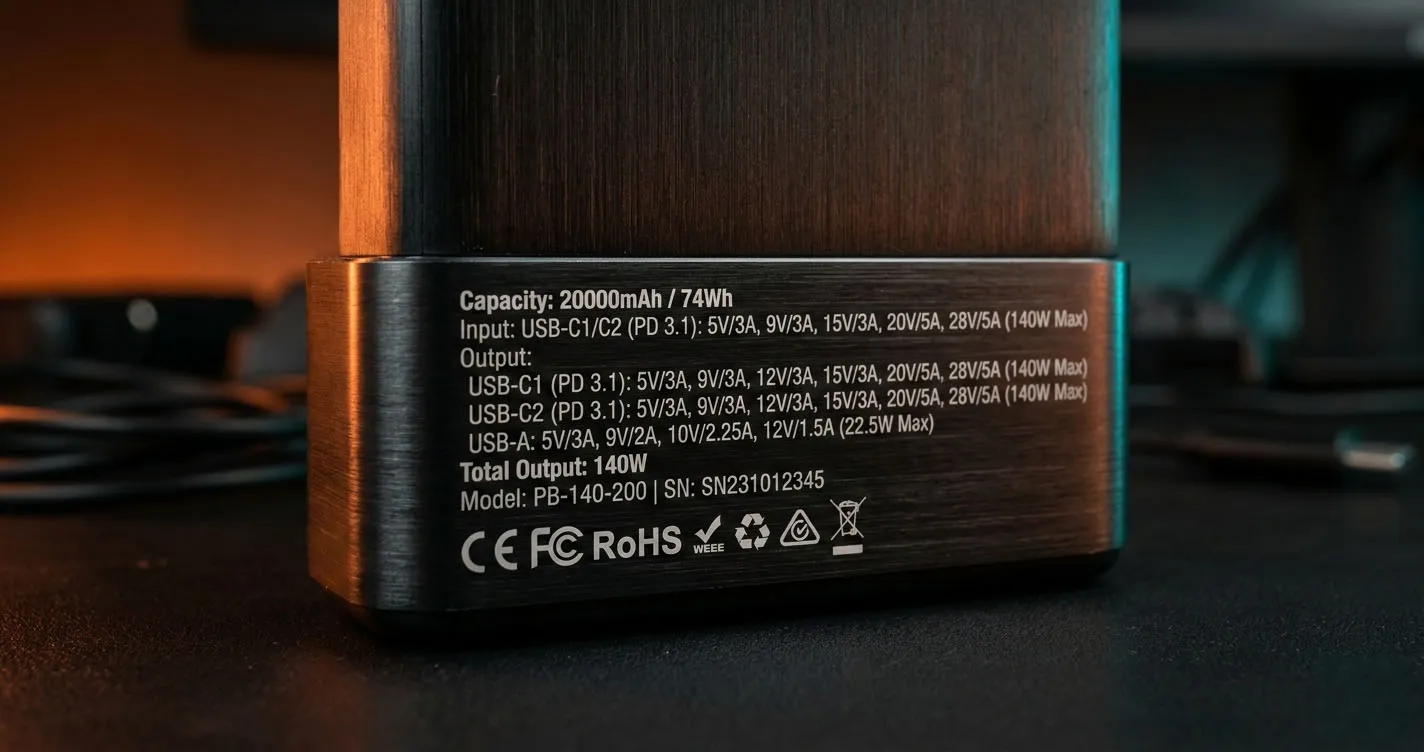
For TSA carry-on regulations, airlines use Wh the limit is 100Wh without prior airline approval. A 26,800mAh power bank at 3.7V = 99.2Wh, which is just under the limit. A 30,000mAh pack typically exceeds 100Wh and cannot be carried on without approval.
Always check the Wh rating printed on the power bank before flying.
How Much mAh Do You Actually Need?
5,000mAh: Emergency Top-Up
One partial charge for most phones. Genuinely pocketable slim 5,000mAh packs from Anker MagGo and Mophie Snap+ Mini weigh under 130g. Good for day trips where you just want peace of mind, not full backup power.
10,000mAh: The Sweet Spot
The most popular tier for good reason. Two full charges for most smartphones. Slim 10,000mAh packs weigh 180-220g and fit in a jacket pocket. Covers a full day of heavy phone use with room to spare. The Anker MagGo 10000 and INIU 10000 are reliable picks at this size.
20,000mAh: Multi-Day or Multi-Device
Four-plus phone charges, or one full laptop charge alongside phone top-ups. Essential for travelers, photographers, and anyone charging multiple devices. Baseus Blade 20000 and the INIU 65W 20000 are strong options. Expect weight around 350–420g.
26,800mAh: Maximum Practical
The highest capacity that consistently stays under TSA’s 100Wh limit. Five to six smartphone charges, or one-and-a-half MacBook Air charges. The Anker 737 PowerCore 26800 is the benchmark in this tier. Heavy at ~480g, but the capacity is worth it for power users and international travelers.
The mAh Fraud Problem
Budget power banks on Amazon and discount sites routinely lie about capacity. A pack claiming 50,000mAh for $12 is physically impossible real 50,000mAh at 3.7V would weigh over 1kg and require cells that cost far more than $12 to manufacture.
How to Spot Fake Capacity Claims
Weight is your first signal. A legitimate 10,000mAh power bank weighs 180–250g. If a “20,000mAh” pack weighs under 200g, the cells inside are far smaller than claimed.
Look for Wh ratings. Reputable brands (Anker, Mophie, Belkin, Baseus, INIU) print the watt-hour rating on the device. No Wh rating is a warning sign.
Suspiciously cheap pricing. Real 20,000mAh capacity uses quality cells that cost money. Below $20 for anything claiming over 15,000mAh should trigger skepticism.
No safety certifications. Look for CE, FCC, UL, or BSMI markings. Brands with no certifications have no third-party testing accountability.
How to Verify Actual Capacity
Use a USB power meter (like the Fnirsi FNB48 or Atorch UD18) between the power bank and your device. It measures actual mAh delivered and wattage in real time. Charge a fully dead phone several times until the bank dies, add up the measured deliveries, and compare to the claimed capacity adjusted for efficiency.
Does mAh Affect Charging Speed?
No mAh tells you how much energy is stored, not how fast it’s delivered. Charging speed is determined by wattage (volts × amps). A 10,000mAh bank with 65W USB-C output charges your phone faster than a 20,000mAh bank with 18W output.
This is a common point of confusion. When shopping for fast charging, look at the output wattage listed on the spec sheet, not the mAh. The mAh tells you how long the party lasts; wattage tells you how fast the drinks flow.
What Wattage to Look For
For iPhone 16: 20W+ USB-C PD, or 15W MagSafe/Qi2 wireless.
For Samsung Galaxy S25: 45W USB-C PD 3.0 with PPS for maximum wired speed.
For MacBook Air: 65W+ USB-C PD.
For MacBook Pro 16: 96W+ USB-C PD.
mAh and Battery Degradation
All lithium-ion batteries degrade over time. A power bank used daily loses roughly 3-5% of its rated capacity per 500 charge cycles. After two years of daily charging, a 10,000mAh bank may deliver the real-world equivalent of 8,500-9,000mAh rather than its original effective output.
Better-quality cells degrade more slowly. This is part of why Anker, Mophie, and Belkin packs tend to last longer than no-name budget packs the quality of the lithium-ion cells inside matters more than any specification on the label.
Store power banks at 40-80% charge when not in use for extended periods. Storing at 0% or 100% long-term accelerates cell degradation and permanently reduces effective capacity.
Quick Reference: mAh Cheat Sheet
For a single day out with one phone, 10,000mAh is the right call. For a weekend trip with a phone and tablet, 20,000mAh covers you comfortably. For international multi-day travel or laptop users, go to 26,800mAh and stay under 100Wh for carry-on compliance. For emergencies only, a 5,000mAh MagSafe pack like the Mophie Snap+ Mini keeps weight negligible.
The number on the label is a starting point. Apply the 80% efficiency rule for wired charging, divide by your device’s battery size, and you’ll know exactly how many charges to expect no surprises.
Found this helpful?
Share this guide with your friends or explore our recommended products.